
I like to think of them as ham radio fish finders – those neat little waterfall displays on many modern radios. No tuning around listening for signals like in the “good old days”, just click on a signal on the waterfall display, throw out your callsign and ya got ’em hooked.
I live very close to Owen Sound Bay which is an inlet of the immense Georgian Bay which is technically part of Lake Huron. The Sydenham river flows into our local bay and at the end of summer every year, thousands of salmon swim up river, leaping over obstacles on their way to their spawning grounds up river. I used to go fishing on a chartered boat out in the bay. The boat was fitted with a fish finder and all we had to do was lower our bait right in front of the fish and haul ’em in. We would go home with several twenty pounders. It was so easy it seemed unsportsmanlike.
I have a few reservations about ham radio waterfall displays. First, none of my radios has one. Second, even if I did own a portable QRP radio with a waterfall display, my aging eyes may not be able to focus on it. Third, it would be unsportsmanlike to use one – well okay, maybe not.
The vast majority of my operating time is spent out in the Big Blue Sky Shack – even during southern Ontario’s less than comfortable winters. But there are times, like when the mercury drops to 99 below and the snow is up to the rooftop, that I do occasionally enjoy the comfort of a steaming cup of Joe inside my warm, comfortable shack. For such occasions I thought it might be nice to go fishing for QSOs on the bands. I made an inquiry on one of the online forums and a kind VKer suggested using the “waterfall only” mode of Fldigi. Fldigi can be used for decoding CW (as well as numerous digital modes) but that would be unsportsmanlike, wouldn’t it?
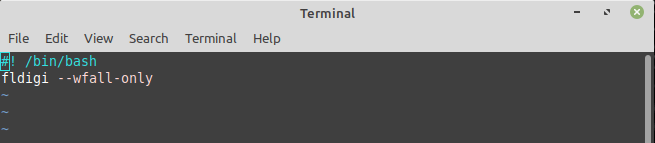
I wrote a little bash script for my Linux laptop to open Fldigi in waterfall only mode. My Linux bash skills are very limited; if you can suggest improvements please let me know in the comments.
This is the result of opening FLDIGI in waterfall only mode. Notice that the usual transmit and receive windows are absent, leaving just the waterfall.

The display looks very similar to the waterfall on a real panadapter. The major difference between this and the real McCoy is this one is based on audio frequencies, whereas a real panadapter uses IF as its signal source.
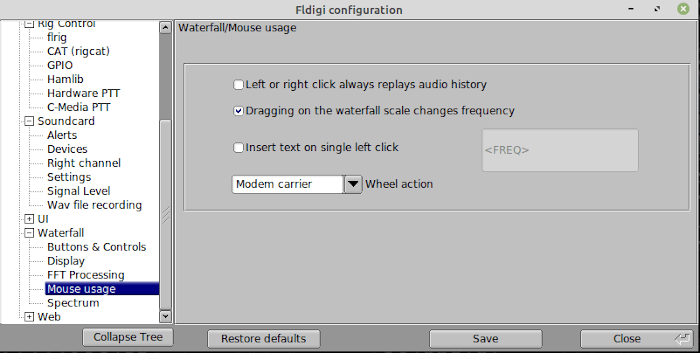
There is one more Fldigi setting you might find useful. Under |Fldigi configuration|Waterfall|Mouse usage| select “Dragging on the waterfall scale changes frequency”. Of course you can click on any signal on the waterfall then click the QSY button to change frequency, but its useful to drag the frequency scale above the waterfall to move to an adjacent part of the band.
How Well Does it Work?
As an experiment, I connected my QRP Labs QMX in this manner. It should be noted that the QMX theoretically supports full panadapter operation by enabling “IQ mode” and monitoring the output with SDR software. I couldn’t get that to work very well for me. Others have also reported problems there too. The QMX is an ever-evolving product so maybe that functionality will become better defined in a future firmware release.
This is how I configured my QMX using |Fldigi configuration|Rig Control|. The QMX emulates a Kenwood TS-440S. Other rigs may require a different setting. Rig control is done over a USB-C to USB-C cable connection between the QMX and the laptop.

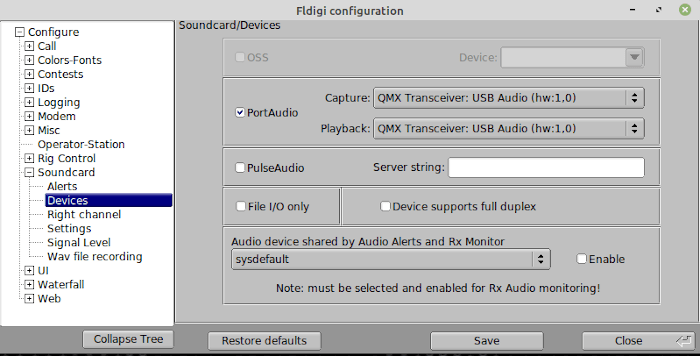
Then under |Fldigi configuration|Soundcard|Devices| select PortAudio and use the scrollbars to select the QMX Transceiver for both Capture and Playback.
Let’s take another look at the resulting waterfall display:
I apologize for the resolution of this image; it’s difficult to squeeze it into the width of this page, but I am sure you can see the basic idea. I did have to lower the bottom range of the waterfall sensitivity to get the waterfall to display. My base station radio has a higher audio output so at first I saw a blank display when I connected the QMX.
The rig control worked splendidly well. As I write this post we are enjoying the dog days of summer, but the dreaded snowy season is on its way before long. Maybe then I’ll enjoy the comfort of that cup of Joe, or maybe even the odd wee dram, and spend winter evenings catching fish inside my nice warm shack.
Help support HamRadioOutsidetheBox
No “tip-jar”, “buy me a coffee”, Patreon, or Amazon links here. I enjoy my hobby and I enjoy writing about it. If you would like to support this blog please follow/subscribe using the link at the bottom of my home page, or like, comment (links at the bottom of each post), repost or share links to my posts on social media. If you would like to email me directly you will find my email address on my QRZ.com page. Thank you!
The following copyright notice applies to all content on this blog.

This work is licensed under a Creative Commons Attribution-NonCommercial-NoDerivatives 4.0 International License.
Discover more from Ham Radio Outside the Box
Subscribe to get the latest posts sent to your email.
 Ham Radio Outside the Box
Clever idea, John! 73, Craig WB3GCK
LikeLike
Thanks Craig.
LikeLike
Panadapters/waterfalls are cool if you are into that sort of thing. However, they represent a fundamentally different user interface that emphasizes sight rather than sound.
My own operating style developed out of the mantra of “listen, listen, listen” so radio is primary an auditory experience. You have to listen to copy that qrp call sign in the noise. You have to listen to the DX station to learn the exchange and procedure. And on the rare occasion that I have a pileup to work through, it’s my ears that sort it out, not my eyes.
But hey, to each their own. Maybe new hams these days are more attuned to visual input. And, I imagine a waterfall is great for monitoring for a band opening instead of constantly tuning up and down hoping to catch the signal.
btw John, for simple commands a bash script is overkill. You could just use alias to assign a shorter command name, like:
alias flw=“fldigi —wfall-only”
put the alias command in your shell profile so it’s always available. Run man alias to read the man page for details.
LikeLike
Thanks for the flw alias tip Matt, I’ll try that. I agree about the auditory experience, especially for CW. Sometimes when tuning around I hear nothing on a frequency where a cluster indicates activity. Maybe the signal is too weak at my QTH or there is a pause in the QSO. A waterfall would immediately indicate whether the frequency is active. Another consideration is that a waterfall doesn’t help when running a frequency.
LikeLike