
Ham radio and computers are inextricably linked these days. I don’t carry a computer out into the Big Blue Sky Shack when I operate portable, but even there I have my phone and use it to access the POTA app and check propagation conditions. I could also log my QSOs directly into HAMRS, but I prefer to log on paper and transfer my log to HAMRS when I get home.
But back in the shack it’s a different story. We can take full advantage of all the information available online to improve our operating experience. My main computing device is an Acer Aspire 3 laptop running Linux Mint with the “73 Linux” software package from KM4ACK.
An old, retired Acer tablet has also been deployed to permanently display the Android “HamClock” app. HamClock displays the UTC and local time (refer to the image below). But that is not the HamClock app we are going to discuss in this post. There is also an amazing piece of software also called “HamClock” that can be used to display a lot more information than just the time.
Several years ago I bought a Raspberry Pi 2 when it was the latest available version. I never did get very much use out of it. It ran FLDIGI fairly well but when I dragged it out of the closet recently and tried to use it to display POTA spots I discovered that it could not access the pota.app site. I believe that was the fault of the browser rather than the pi itself but still, the pi went back into the closet.
Replacing the RPi2 was not a difficult choice when I read about a device called the inovato Quadra. The Quadra is not only a very small, yet powerful computing platform (Quad-core A53 ARM v8 64-bit SoC, 1.7ghz), but it is also very inexpensive. I ordered one right away.
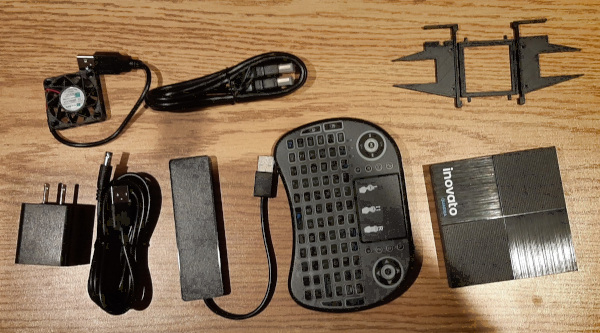
BOTTOM ROW: RF quiet power plug and cable, USB hub, miniature keyboard, inovato Quadra
The biggest selling point that prompted me to click the buy button was the fact that the Quadra can be setup as a dedicated HamClock appliance. That is a choice the user can make when setting up the device. Other software is pre-installed but my laptop with the 73 Linux package already contains more than enough apps for my needs. Now, when I power up the Quadra it boots straight into HamClock – perfect.
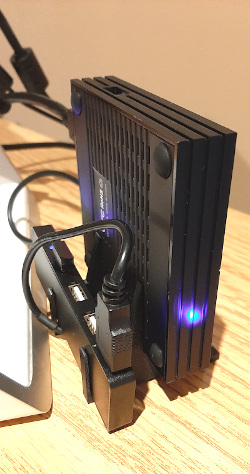
I ordered the complete hardware package which includes the inovato Quadra, a custom stand that holds the device, a cooling fan and a USB hub. Also included in the package is a miniature wireless keyboard, an RF quiet AC/5V power plug and an HDMI cable.
The keyboard is powered by a pair of AAA batteries and can be left permanently switched on. It goes to sleep when not used for more than a few seconds and can be woken up by pressing any key.
My package was shipped very quickly and made its way by USPS from Oregon to LAX then overnight to Toronto where is sat for a few days while it was assessed by the taxman – ah, death and taxes! It was finally delivered by Canada Post after a little over a week.
After unpacking, the Quadra was assembled and after just a couple of minutes of easy setup, HamClock was running on my HP 22-inch monitor.
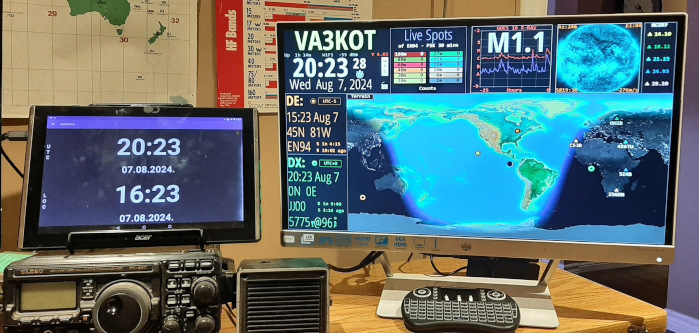
“HamClock” the android app is displayed on the small screen to the left.
As you can see from the picture, HamClock can display a wealth of information. Each individual panel of the display can be custom configured to display the user’s choice of data from a wide variety of sources. Whether you are interested in solar conditions affecting propagation, or HF beacons, or DX/SOTA/POTA spots, or a map showing the orbits of AMSAT satellites and much more, HamClock can display a real time information panel to keep you informed. For a complete description of this powerful software visit this site.
FInally, a very useful feature of this setup is the ability to display the HamClock screen on any device (PC, phone, tablet) connected to the same network. I can check radio conditions on my tablet at any time from anywhere within reach of WiFi – brilliant.
Help support HamRadioOutsidetheBox
No “tip-jar”, “buy me a coffee”, Patreon, or Amazon links here. I enjoy my hobby and I enjoy writing about it. If you would like to support this blog please follow/subscribe using the link at the bottom of my home page, or like, comment (links at the bottom of each post), repost or share links to my posts on social media. If you would like to email me directly you will find my email address on my QRZ.com page. Thank you!
The following copyright notice applies to all content on this blog.

This work is licensed under a Creative Commons Attribution-NonCommercial-NoDerivatives 4.0 International License.
Discover more from Ham Radio Outside the Box
Subscribe to get the latest posts sent to your email.
 Ham Radio Outside the Box